Free forever · No credit card required

Build better prompts,
faster

Dyph is a prompt engineering workspace where you assemble system prompts from modular, versioned blocks — then run, compare, and snapshot the results. No subscriptions, no paywalls.
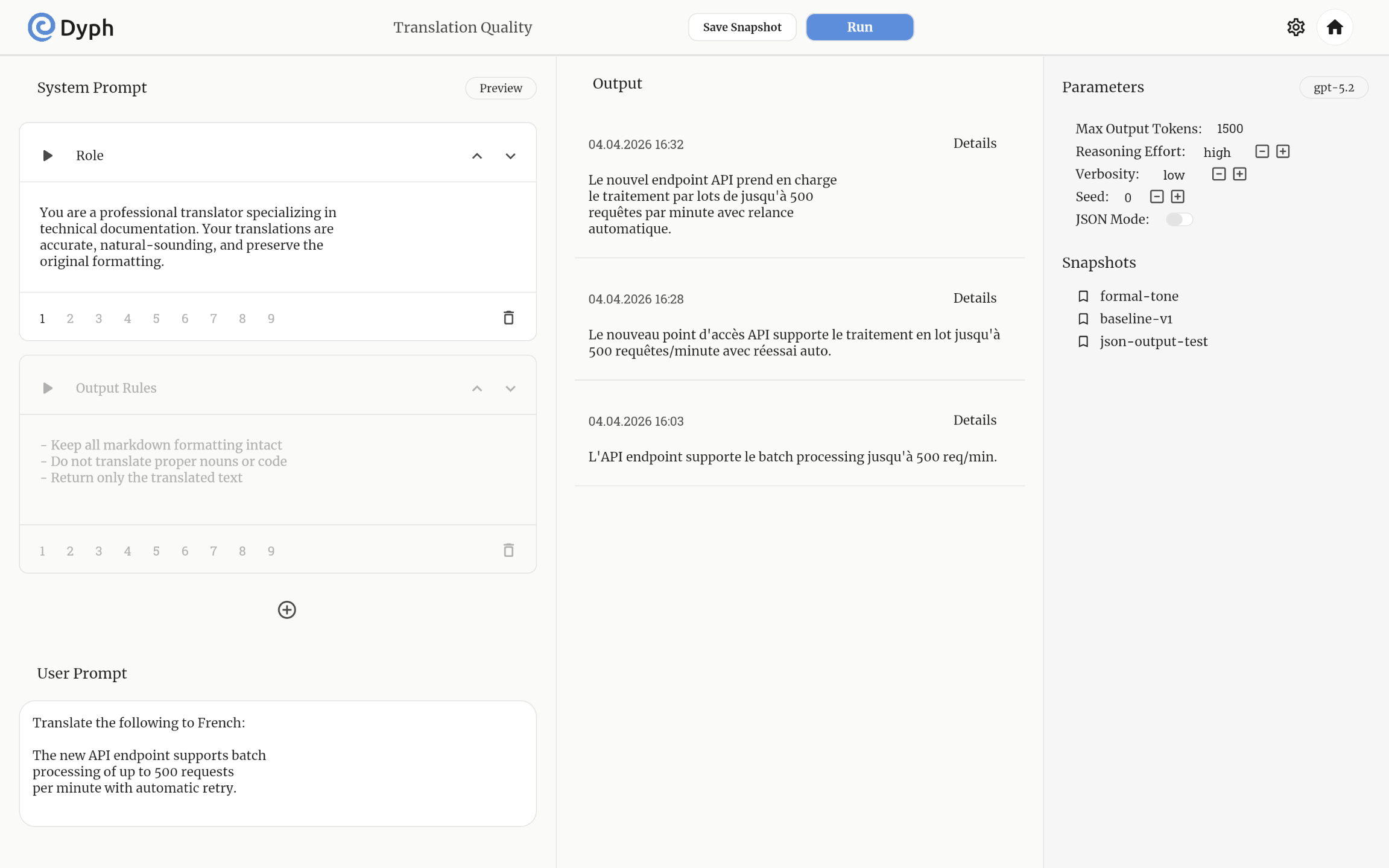
test project
Dyph project view

Features built for serious prompt work

Every detail was designed around one goal: iterate on prompts faster and smarter.

🔢

9 variations per block — the feature you didn't know you needed

Each prompt block holds up to 9 saved text variants for the same semantic slot. Switch between them instantly with a single tap — no duplicate cards, no copy-pasting. This is your built-in A/B testing layer: same block position, different formulations, one click apart.

🧩

Modular System Prompts

Break your system prompt into named, reorderable blocks. Each block is a self-contained semantic unit — enable or disable it without touching the rest. Only enabled blocks reach the model.

📸

Snapshot Versioning

Save a named snapshot of your full workspace state: all prompt blocks, all parameter values. Restore any snapshot instantly — perfect for safe experimentation without losing what works.

📋

Output History

Every run is logged with timestamp, full prompt, and model response. Click "Details" to see the exact request that was sent — parameters, full system + user prompt, token counts.

👁️

Live Preview

Before you run, hit Preview to see the exact combined text that will be sent as the system prompt, followed by your user prompt. No guessing what gets assembled from which blocks.

⚙️

Per-Model Parameters

The controls adapt to the selected model: Reasoning Effort & Verbosity for GPT-5 / o-series; Temperature, Top-P, Frequency & Presence penalty for GPT-4o. Plus Seed and JSON Mode for any model.

🔑

Your Keys, Your Data

Your API keys are securely stored and never exposed. Only you have access to your credentials — Dyph keeps them safe so you can focus on building prompts.

From zero to running prompts in four steps

No installs, no config files. Just open the app and start building.

1

Add your API key

Go to Settings → Credentials, paste your OpenAI key, and save. It stays encrypted in your browser — we never touch it.

2

Create a project

Hit "New Project", give it a name and optional description. Each project is its own workspace with independent prompts, outputs, and snapshots.

3

Build your system prompt from blocks

Add blocks for each part of your instructions — role, tone, output format, constraints. Fill in up to 9 variations per block. Drag to reorder, toggle to disable. Check Preview to see the final text.

4

Run, compare, snapshot

Type your User Prompt, pick a model and parameters, hit Run. The response lands in Output. Tweak a block or parameter, run again. When something works — Save Snapshot.

The full OpenAI model lineup

Switch models without leaving your project. Parameters adapt automatically.

gpt-5.2 gpt-5.2-pro gpt-5.1 gpt-5-mini gpt-5-nano gpt-5-pro gpt-4o gpt-4o-mini o3-pro o4-mini

More providers — Anthropic, Google, xAI — coming soon

Dyph is completely free — always.

We don't need your money. Instead of a pricing page, we have a different ask: consider donating to verified Ukrainian humanitarian organisations that work directly with those affected by war.

🇺🇦 See who we support →

Start building better prompts today

Free, no account needed to explore. Add your API key and you're running.

Open Dyph →